Personal branding on LinkedIn, built from work you actually did
Personal branding on LinkedIn is what people connect with your name when it shows up in their feed. You build it in three parts: a profile that says one thing clearly, 3 to 5 topics you keep coming back to, and posts drawn from your real work every week. The profile gets you found. The posts get you remembered.
This guide is for solopreneurs, freelancers, consultants and creators whose personal brand is the business. Below: the profile fields that matter, how to pick your topics, where the posts come from, and what to skip.
 By Yannis Azouz, founder of LitPost
Updated
Key takeaways
- Treat your profile as a landing page. The headline says who you help and how, in words a client would use.
- Pick 3 to 5 topics and stay on them. People remember you for what you repeat.
- Post from real work: something you finished, a number that moved, a lesson, a question a client asked.
- Creator mode is gone. LinkedIn removed the toggle in 2024, so advice to turn it on is out of date.
- Skip tools that automate comments, DMs or connection requests. LinkedIn's help center says it doesn't permit them.
What is personal branding on LinkedIn?
Personal branding on LinkedIn is the reputation your profile and posts build around your name, which has little to do with a logo, a color palette or a clever tagline.
It's the answer someone gives when a friend asks who to talk to about a problem you solve.
Two things build it. Your profile says what you do, and your posts show you doing it, week after week.
Most guides spend their length on the profile, which is odd, because the profile takes an afternoon while the posts take the rest of the year, and the posts are where people actually meet you. That's in the feed, not on your profile page.
For a solopreneur this matters more than for an employee. Your personal brand is your distribution: if nobody connects your name with what you sell, nobody thinks of you when they need it.
How do you set up your LinkedIn profile for a personal brand?
Make every field say the same thing: who you help and how. A visitor should get it from the headline alone, before they scroll.
Four fields do most of the work.
| Field | What it should say | Fill-in example |
|---|---|---|
| Headline | Who you help, with what, in their words | I help [who] [get what result] with [your method or product] |
| About | The problem, how you work, proof, how to reach you | [Your client's problem]. I [what you do about it]. Recently: [one real result]. [How to start working with you]. |
| Featured | The 1 to 3 things you want a visitor to open | [Your best post], [your offer page], [a case study or talk] |
| Banner | The headline again, or the result, in one line | [What you do] for [who] |
Write the headline in your client's words, not your job title. "Freelance developer" describes you, while "I build booking systems for physio clinics" describes what a clinic owner gets, which is the only thing they're scanning for.
One correction while you're in your settings. Some guides that rank for this query, like Tim Queen's, still tell you to turn on creator mode. LinkedIn removed that toggle in 2024, starting with profile hashtags in February (Social Media Today, February 5, 2024).
There's nothing to switch on. The Follow button stays available to everyone.
How do you pick what you're known for?
Pick 3 to 5 topics, often called content pillars, and post inside them. Fewer than three gets repetitive, and with more than five, nobody who scrolls past you twice can say what you're about.
A good pillar sits where three things overlap: what you know, what your clients care about, and what you do every week anyway. The last one matters most, because a topic that needs fresh research every time is one you'll quietly stop posting about the first time a busy week comes along.
| Pillar | Who it's for | Where the material comes from |
|---|---|---|
| [Your craft] | People doing the same job | What you shipped, broke and fixed |
| [Your client's problem] | Your buyers | Questions clients asked this month |
| [Your numbers] | Peers and future clients | Revenue, traffic or results, with dates |
| [How you work] | Anyone curious about your path | Tools, routines and decisions you made |
Write yours down, then check each one against your last 10 posts, if you have them.
A pillar you never post about isn't a pillar yet.
If you'd rather talk it through, LitPost, a personal branding tool for LinkedIn and X, ends its Brand Copilot interview by proposing 3 to 5 pillars from your answers. You confirm them or change them.
What should you post to build a personal brand on LinkedIn?
Post about things that really happened in your work, inside your pillars. Real events beat generic advice for two reasons: nobody else can write them, and they prove what your profile claims.
Four places to look every week:
- What you finished. A feature, a client project, a talk, an article. Say what it does for someone, not just that it's done.
- What moved. A number with a date: a first sale, a traffic jump, a client who renewed. Show the before and the after.
- What you learned. A mistake, a test that failed, an opinion you changed. Say what you'll do differently.
- What people asked. A client's question, a DM, a comment. Answer it in public.
Each one comes out in your own words, because it's your own material. The LinkedIn post ideas guide has 30 more prompts like these, grouped the same way.
Here's the first one in practice, from my own week. On Sunday, November 8, 2026, an update to LitPost's Starting points went live: it now says when GitHub has nothing new, and drops GitHub ideas once they go stale. It showed up in my starting points as a draft, with the GitHub event it came from above it.
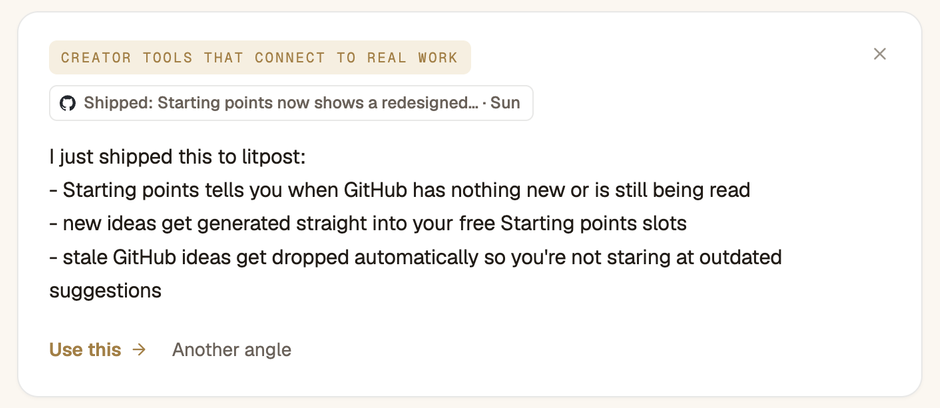
It's a starting point, not the post. It lists three changes. Before it goes out, I'd lead with the one a reader would notice and cut the rest.
A post like that does two jobs at once. It tells people what you do, and it shows you doing it.
How often should you post on LinkedIn?
Post as often as you have something real, on a rhythm you can keep for three months. For most solopreneurs that means once or twice a week.
Steady beats busy.
Being remembered for a topic takes repetition spread out over time, so ten posts in one week followed by a silent month do less for you than one post a week for ten weeks.
Two habits make the rhythm easier:
- Collect during the week, write once. Keep a note of anything that happens in your work. On Friday, pick the best item.
- Write the same idea for X. One event can become a LinkedIn post and a short X thread. Rewrite it for each network instead of pasting.
If a week has nothing worth saying, skip it. A missed week costs less than a post you didn't mean.
How do you grow a personal brand on LinkedIn without automation?
Grow it by talking to people yourself. Comment on posts in your niche, reply to every comment on yours, and write your own DMs.
A simple routine to start: five comments a day that add a fact, a story or a question, on posts by people your clients follow. Their audience reads those comments too.
Tools that do this for you are tempting, and LinkedIn is clear about them. Its help center says "we don't permit the use of any third party software, including 'crawlers', bots, browser plug-ins, or browser extensions" that scrape, change the look of, or automate activity on LinkedIn. Members who use them "risk having their accounts restricted or shut down" (LinkedIn Help, read November 2026).
There's also a simpler problem. If a tool posts, comments or connects without you, the reputation it builds isn't really yours.
When personal branding on LinkedIn isn't worth it
LinkedIn isn't the right place for everyone. Three cases where your time goes further elsewhere:
- Your buyers aren't there. If your clients live on Instagram, YouTube or a niche forum, build there first.
- You can't say what you do in one line yet. Fix the offer before the profile. A personal brand amplifies a clear message, but it can't create one.
- You'd hand it to someone who invents stories. A ghostwriter who makes up lessons you never learned builds a reputation you then have to live up to on every call.
Do this this week
- Rewrite your headline as "I help [who] [get what] with [how]".
- Write down 3 to 5 pillars and check them against your last 10 posts.
- Start a note called "this week" and add anything that happens in your work.
- On Friday, pick one item from the note and post it. Check where "see more" cuts it with the free LinkedIn post formatter.
- Leave five comments that add something, on posts your clients read.
Personal branding on LinkedIn: questions
Do I still need creator mode for personal branding on LinkedIn?
No. LinkedIn removed the creator mode toggle in 2024, starting with profile hashtags in February, as Social Media Today reported on February 5, 2024. There's nothing to turn on. The Follow button stays available to all members, so people can follow your posts without connecting with you.
What should my LinkedIn banner say for personal branding?
One line: what you do and for whom, or the result clients get. Keep it short enough to read on a phone, and keep text away from the bottom left, where your profile photo sits. The banner repeats your headline. It shouldn't introduce a second message.
Can I build a personal brand on LinkedIn without posting?
Barely. A strong profile helps people who already look you up, but it doesn't put your name in front of anyone new. Thoughtful comments on other people's posts are the closest substitute. Posting is what reaches people who haven't met you yet, and that's where a personal brand grows.
Do I need a personal branding course?
No. Most courses teach the same three steps: fix your profile, post consistently and engage with others. The hard part, having something real to say every week, is the one thing no course can supply for you. Start from your own work, post for a month, then decide if you need help.
Should I use AI to write my LinkedIn posts?
Partly. AI is good at the mechanics: cutting a draft, formatting it, translating it. It can't know what happened in your week or what you think about it. A post built on something you lived reads like you. A post generated from a topic reads like everyone else's.
How do I build a personal brand on LinkedIn and X at the same time?
Post the same idea on both, written for each. LinkedIn takes a longer post with line breaks. X takes a short version or a thread. Keep the same event and the same opinion in two formats, so people who follow you on both see one person, not two.

Your work already has the posts in it
LitPost reads what you shipped, sold and published, finds what's worth a post on LinkedIn and X, and helps you shape it in your voice. You decide what goes out.
Start for free7-day free trial. No credit card.